> For the complete documentation index, see [llms.txt](https://thuedientu.hotrokekhai.com/llms.txt). Markdown versions of documentation pages are available by appending `.md` to page URLs; this page is available as [Markdown](https://thuedientu.hotrokekhai.com/huong-dan-cai-plugin-moi-truong-de-nop-to-khai-thue/sua-loi-chua-bat-plugin-ky-so.md).
# Sửa lỗi chưa bật plugin ký số
Hướng dẫn sửa lỗi plugin ký số chưa được chạy khi ký tờ khai - lấy lại mật khẩu trên thuedientu.gdt.gov.vn
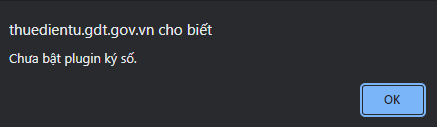
Lỗi chưa bật Plugin ký số.
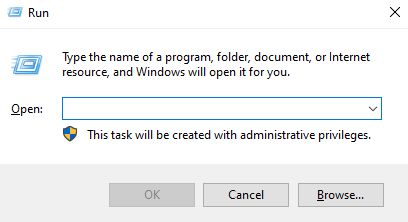
**Bước 1: Mở hộp thoại Run bằng 1 trong 2 cách sau:**
* Cách 1: Ấn tổ hợp phím Window + R
* Cách 2: Click vào biểu tượng Window ở góc dưới cùng bên tay trái thanh Taskbar
Mở hộp thoại Run
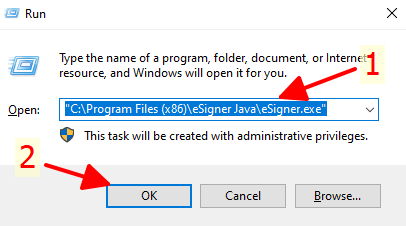
**Bước 2: Copy đường dẫn sau** "C:\Program Files (x86)\eSigner Java\eSigner.exe" **và paste (dán) vào hộp thoại Run sau đó ấn OK**
Dán và chạy đường dẫn vừa copy.
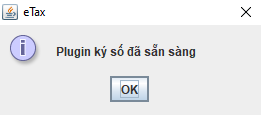
* Nếu hiển thị thông báo như bên dưới là đã bật Plugin ký số thành công, bạn hãy thử ký lại tờ khai và lấy lại mật khẩu xem đã được chưa.
Plguin ký số đã bật.
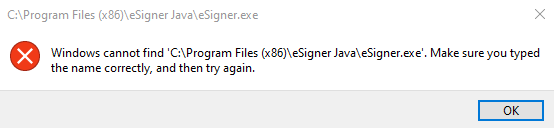
* Nếu hiển thị thông báo đỏ như thế này tức là bạn chưa cài Plugin ký số
Chưa cài Plugin ký số.
Làm theo hướng dẫn bên dưới để thực hiện cài đặt Plguin ký số nhé !
{% content-ref url="/pages/twogjUDXA1VcjGKozjxW" %}
[Hướng dẫn cài plugin thuedientu](/huong-dan-cai-plugin-moi-truong-de-nop-to-khai-thue/huong-dan-cai-plugin-thuedientu.md)
{% endcontent-ref %}
{% hint style="success" %}
`Chúc các bạn thành công,nếu các bạn cần hỗ trợ hãy gọi số 0378 823 426 để được hỗ trợ miễn phí`
`Ngoài ra tôi cũng hỗ trợ lấy lại mật khẩu trang thuedientu nữa nhé !!!`
`Nếu bài viết này hữu ích và giúp bạn khắc phục vấn đề bạn có thể tặng ly cà phê cho tôi qua STK sau hihi`